Handling failed and stuck online payments
Goal
Deal promptly with failed online payments: rescuing a registration when a card is declined, resolving amounts that were taken but left pending, and reactivating requests cancelled because payment was late.
When do you need this?
- A parent complains that the online payment failed and wants their child's registration activated quickly.
- Money was taken from the parent's card but the request's status did not change to Paid.
- A registration request was cancelled automatically for missing the payment window, and you want it back.
Before you start
- To confirm a payment by hand: you need permission to confirm payments (or the Finance or Cashier role).
- To restore a cancelled request: you need permission to re-register.
- Make sure the right school is selected in the school switcher first.
Where it lives
Sidebar > Registrations > find the student concerned > press Manage to open the registration management page, where the action buttons appear (confirm payment, re-register, and so on).
Scenario 1: the transaction is declined by the parent's card
- The problem: paying the fees with the parent's card fails and they see an error during the online payment.
- Likely cause: insufficient funds, online purchases not enabled on the card, or the card's daily limit exceeded.
- The fix:
- Ask the parent to try again with a different card or another payment method available to them.
- The immediate alternative (taking cash): if the parent brings the money in cash and you have permission to confirm payments, you can record it straight away by pressing Confirm Payment and entering the paper receipt number; the system bypasses the online payment path and activates the registration. Full details in Confirming a cash payment.
Scenario 2: the parent was charged and the request is still pending
- The problem: the amount was taken from the parent's card and they received a debit notification, but the request's status in the admin portal did not change to Paid.
- What you may see in the status:
- If the payment reached the platform, the status may pass momentarily through User paid and then settle on Paid by itself. Nothing is required from you, and an online payment is never confirmed by hand.
- If the payment confirmation did not reach the platform, the request may stay Awaiting payment despite the money actually being taken.
- The fix depends on the status shown:
- Awaiting payment despite the money being taken: wait, and do not confirm the payment by hand. The platform re-checks the payment gateway automatically and corrects the status itself, usually within half an hour at most.
- If it is still Awaiting payment after that, contact support and do not use Confirm payment.
- If the status stays at User paid, that is a transient state that registrations are not supposed to settle in; contact support. Pressing Confirm payment on it returns a message that the payment was already confirmed, and changes nothing.
The Confirm payment button is for cash actually received at the school, and it works on a registration whose status is Awaiting payment. Using it on a registration whose method is online leads to one of two things, and both are harmful:
- If the parent really did pay, the system refuses the operation and shows an error — because the payment link is complete and cannot be cancelled.
- If they did not pay, the operation succeeds: it cancels the parent's live payment link, records the fees as cash the school received when it did not, and sends the parent a notification and an invoice activating the enrolment — with no way back.
The reference number a parent sends you cannot be verified at entry, so it is not a sound basis for moving a status to Paid.
Scenario 3: the request was cancelled when the payment window expired, and restoring it
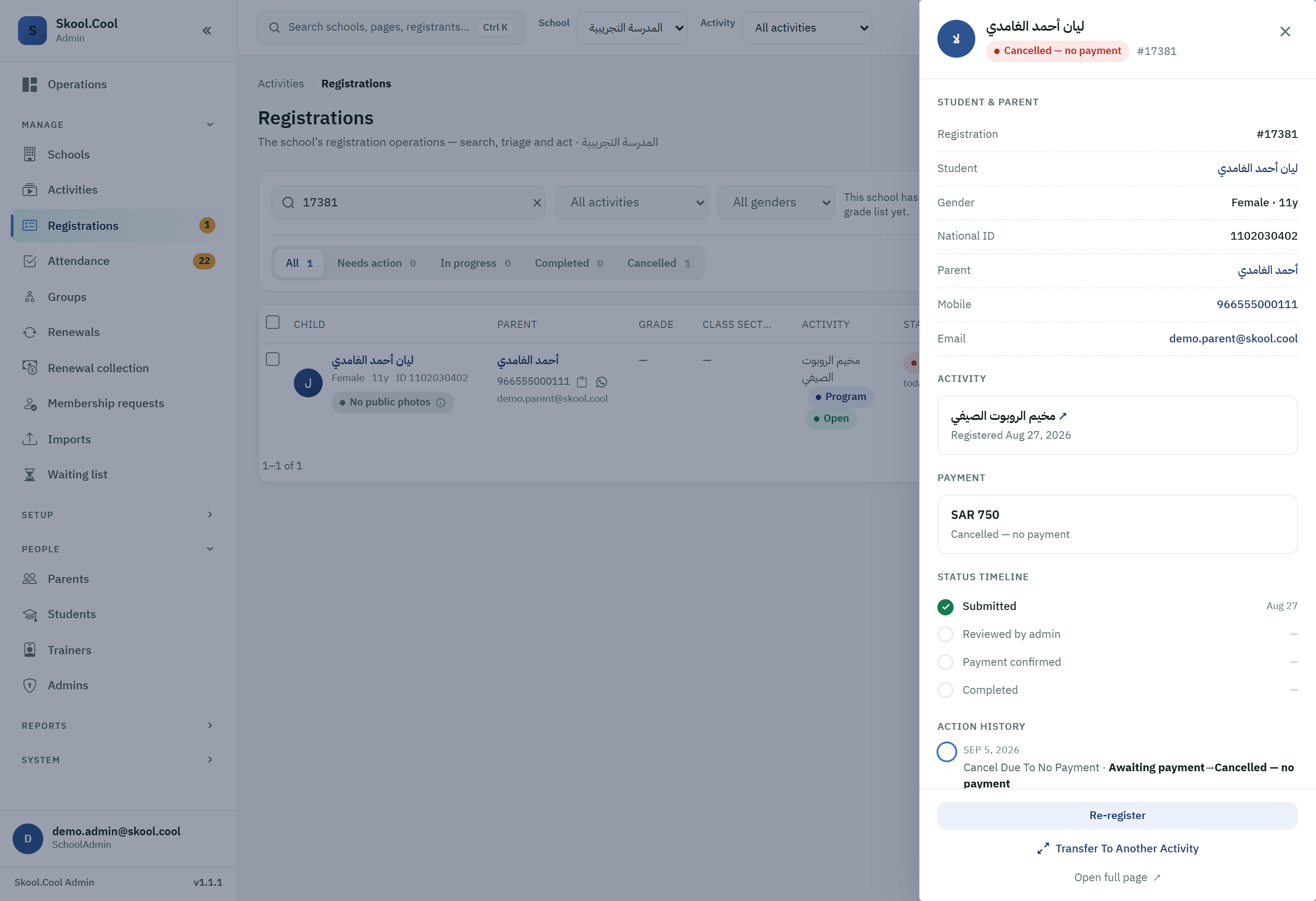
- The problem: the student's registration request was cancelled and its status became Cancelled — no payment for exceeding the allowed payment window.
- Likely cause: the parent was late paying online after their request was approved.
- The fix (restoring the request):
- From the Registrations screen, choose the Cancelled triage group to find the cancelled request.
- Open the request with Manage; if restoring is available, a Re-register option appears.
- Press Re-register and then Confirm. The system returns the request to Awaiting payment so the parent can complete the payment again.
What you should end up with
- After confirming payment (scenarios 1 and 2): the registration becomes Paid, the student is added to the attendance roster, and the parent receives the invoice notification.
- After re-registering (scenario 3): the request returns to Awaiting payment and the parent can pay again.
Frequently asked questions
The parent says the money was taken but the status is still "Awaiting payment" — what do I do? Wait, and do not confirm the payment by hand. The platform asks the payment gateway itself and corrects the status automatically, usually within half an hour. If it is still Awaiting payment after that, contact support — the reference number from the parent cannot be verified, and Confirm payment on an online registration is either refused or cancels their payment link and records cash the school never received. The Confirm payment button is for cash actually received; see Confirming a cash payment.
What does the "User paid" status mean? It means the online payment reached the platform and it is completing the settlement. It is a transient state that settles on Paid automatically with no intervention from you — it is not a work queue awaiting your approval. If you see a registration stuck in it, contact support; Confirm payment on it returns that the payment was already confirmed. The complete list of statuses is in Reference: payment states.
Why was the student's request cancelled without me doing anything? Because the parent exceeded the payment window after the request was approved, so it turned automatically into Cancelled — no payment. You can restore it from the Cancelled group through the Re-register option, if it is available.
Where do I find cancelled requests so I can re-register them? From the Registrations screen choose the Cancelled triage group, then open the request with Manage and use Re-register. How to triage and filter is in Reviewing registrations.
The parent wants to pay cash instead of online — how do I switch the payment method? If the guardian chose Online and wants to pay in cash, no switch button is needed; simply confirm the cash payment with Confirm payment, and the system changes the payment method to Cash automatically and shows you a notice saying so. If instead they chose Cash and you want to move them to online payment, use Switch to online, as described in Switching to online payment.