The payment and booking statuses, and what they mean
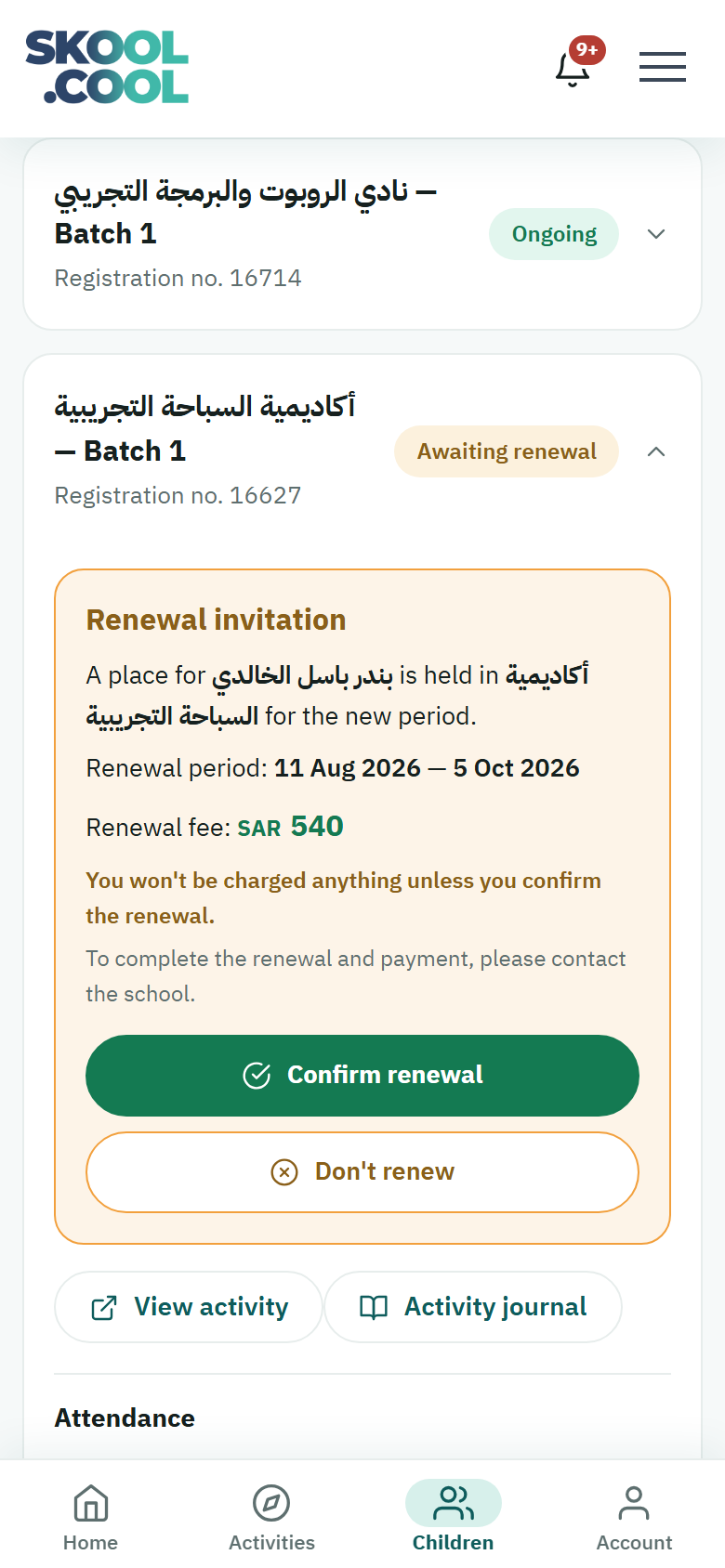
Every registration on a paid activity has a status showing where it stands financially. You keep track of it from the Current activities page in your account.
The table of statuses
| The status in the app | What it means | What you need to do |
|---|---|---|
| Pending review | The request is being checked by the school before payment is accepted. | Nothing — wait for the acceptance notification. |
| Declined | The school did not accept the request. | Ask the school why, or register for another suitable activity. |
| Awaiting payment | The request was accepted, and the fees must be paid to confirm the place. | Pay the fees online, or in cash at the school, to avoid the booking being cancelled. |
| Confirming payment | You paid online, or reported a cash payment, and it is being verified. | Wait a few minutes for the status to update, or check with the school's accountant. |
| Partially paid | The school has received part of the fees in cash, and your child's place is held and they attend the sessions as usual. Expanding the activity's card shows how much you have paid out of the total, what is outstanding, and when it is due, if the school set a date. | Pay the remainder at the school, and before the due date if there is one. |
| Paid | The fees were received in full and the place is finally confirmed. If you are not the parent who registered the child, you may see this status before the fees are paid in full; see "Who sees the payment details?" below. | Nothing — your child is ready for the sessions. |
| Ongoing | The registration is active and the child is carrying on with the activity's sessions. | Nothing — keep track of the session times from your account. |
| Awaiting renewal | An invitation to renew the child's registration for the coming period, awaiting your reply. | Confirm the renewal to hold the place, or decline it to free the place for somebody else. |
| Absent | The child was recorded absent from one session or more. | Check with the school if the absence has a reason, or if you have a question. |
| Transferred | The child's registration was moved from this activity to another. | Keep track of the new activity's details from the current activities page. |
| Completed | The activity ran its full length and has ended. | Nothing — it appears among the previous activities for reference. |
| Cancelled — no payment | The registration was cancelled automatically because the payment deadline passed unpaid. | If you want, start a new registration when places are available. |
| Cancelled | The registration was cancelled, by you or by the school. | If you want, start a new registration when places are available. |
| Refunded | The registration was cancelled and the fees returned. | Check your bank account (for an online payment) or collect the money from the school (for cash). |
A free activity needs no fees; the registration is activated straight away with no payment step.
The Partially paid status, and the amounts paid and outstanding, appear on the activity card only for the parent who registered the child. If you are another parent linked to the child, these details do not appear on your card, and it may show the status Paid even though part of the fees has not been paid yet. You may still receive the Payment received notification and an email, both giving the amount received and what is outstanding. Ask the parent who registered the child, or the school, about the remainder.
Frequently asked questions
What does Awaiting payment mean? Your request was accepted and the fees must be paid to confirm the place — pay online or in cash at the school before the deadline passes.
I paid but the status is Confirming payment — why? The transaction is being verified, either by the banking network updating or by the accountant checking it, and becomes Paid once confirmed. If it takes a long while, give the school the transaction number or the receipt.
After paying, a message said "We couldn't check the payment status just now. This doesn't mean the payment failed." — what do I do? The page could not read the status (usually because of a weak connection), and the message does not mean your payment failed. Press Retry on the same page, or check the status later from the Current activities page.
What does Partially paid mean? It means the school accepts the fees in cash in more than one instalment, that it has received part of them, and that your child's place is held. Expand the activity's card on the Current activities page to see how much you have paid out of the total, what is outstanding and when it is due, if the school set a date, then pay the remainder at the school. Once the fees are paid in full, the status becomes Paid. The detail is in The payment methods available.
When is my child ready to attend? Once the status reaches Paid or Partially paid — at which point they are entered on the attendance roster automatically.
How do I know my fees have been refunded? At the status Refunded: for an online payment the money appears in your bank account, and for cash you collect it from the school, according to its refund policy.